
Every sponsor placement, verified on air.
Brandscan watches your live broadcast, checks every graphic, overlay, and announcer read against what you sold, and has an accurate as-run report ready for sales and billing the same night.
Built for MLB, NBA, NFL, NHL, and WNBA broadcasts, and flexible enough for any other broadcast environment.
Broadcast footage: Brandscan tags sponsor elements from the live feed, so your team can review them during the game.
Your as-run shouldn’t depend on scrubbing tape.
Most teams still build the as-run by scrubbing through recordings by hand. It’s slow, it misses things, and a missed placement found a week later is a much harder conversation.
Brandscan does that work from the live feed, while the game is still on. By the end of the night, sales and billing have an accurate as-run showing what aired, what didn’t, and what’s owed.
One game night with Brandscan
-
Pregame
Inventory is scheduled
Every billboard, feature, linescore, and read sold for tonight is already on the traffic calendar.
-
Live
Every placement is detected
Brandscan processes the live program feed and logs each graphic, overlay, and spoken read, so your team can check results before the final whistle.
-
Final
Delivery is reconciled
Delivered placements are marked filled. Missed hits and competing-brand conflicts are flagged for make-goods.
-
Postgame
As-run is ready
An accurate as-run report is waiting for sales and billing to review the next day, before anything goes to sponsors.
It sees what your sponsors paid for.
Computer vision and speech-to-text work together, so Brandscan catches placements on screen and on mic, and tells broadcaster graphics apart from arena signage and commercial spots.
Broadcast graphics
Scorebugs, L-bars, lower thirds, and virtual turf mats inserted by the broadcaster, each logged with its own timing and screen share.
Sponsored segments and signage
Gameflow, billboard, and Staylive placements, plus dasher boards and LED ribbons, each classified on its own.
Announcer reads
Every spoken sponsor mention is transcribed and checked against the contract script copy.
From the season plan to the sponsor report
Plan the whole season’s inventory
Lay out every sponsor element across every game in one traffic calendar, from opening and closing billboards to features, linescores, and virtual signage. Because Brandscan knows what should air, it can tell you exactly what didn’t.
Verify every placement, frame by frame
Each hit is logged with its screen position, share of the frame, duration, occlusion, and visual stability. Delivered placements are marked filled, missed ones trigger make-good reconciliation, and competing brands are flagged for exclusivity.
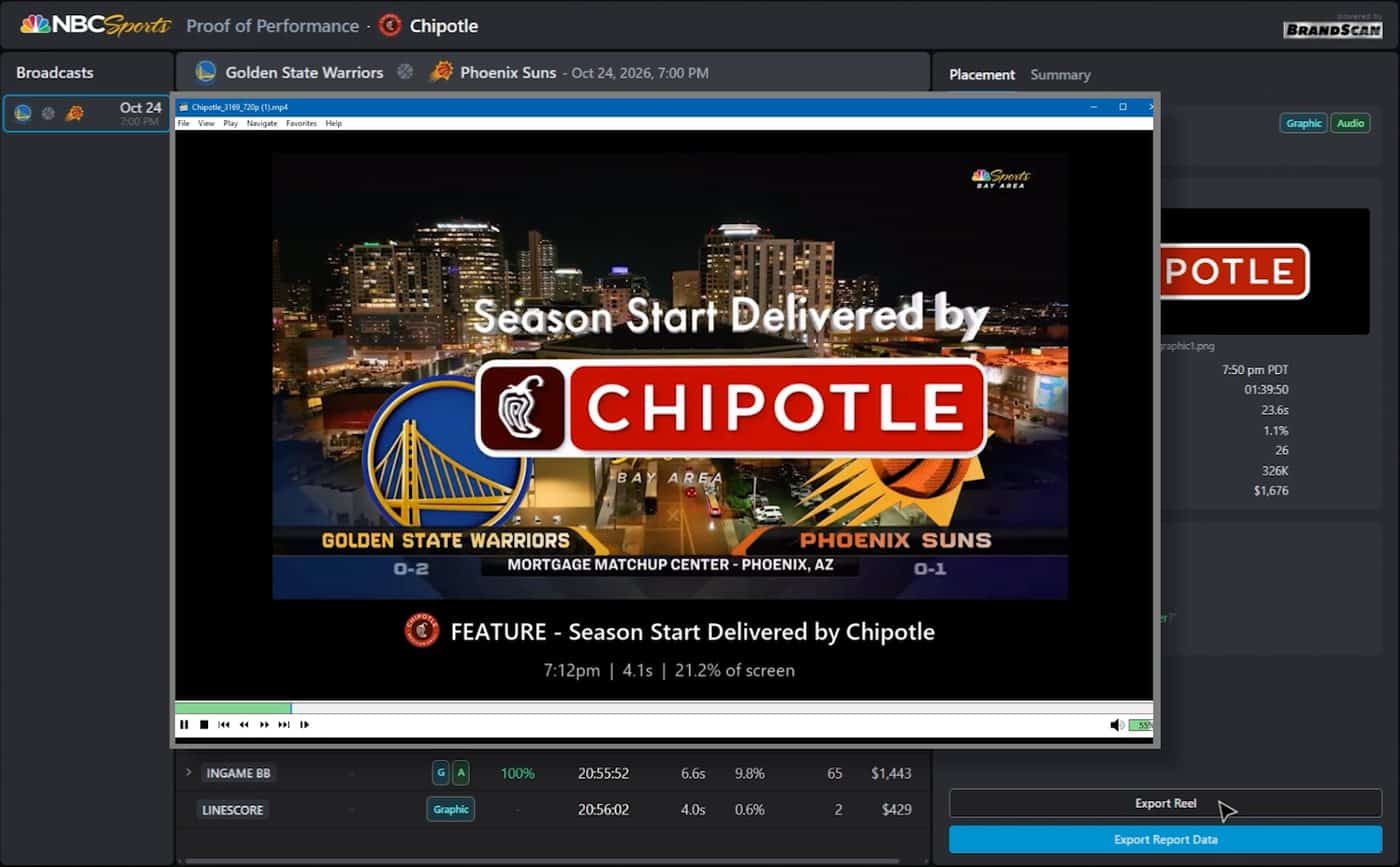
Share proof on your terms
Once your team has reviewed the as-run, send partners proof-of-performance reels and PDF or Excel reports. You choose what each sponsor sees, and when.
Measure the value of every exposure
See total screen time, share of voice against the other sponsors on the broadcast, and media value, with Nielsen viewership lined up against the moment each placement aired.
Plugs into the feed you already produce
Brandscan runs on VideoShip’s cloud, fed by the same technology that powers iNet.Live and the iNet.Sport Media Hub.
-
Ingest
iNet.Live captures the program feed from the truck, venue, or studio over IP, with dual-path redundancy so no frames are dropped. Compact appliances take 2, 4, or 8 HDMI/SDI inputs.
-
Analyze
VideoShip’s cloud processes the live feed with computer vision and speech-to-text, separating overlays from signage and catching announcer reads.
-
Deliver
Review results during the game, clip any moment, and export reports. Data is kept long-term, so you can look back across the season.
See Brandscan on your broadcast.
Tell us about your workflow, and we’ll set up a walkthrough.